ffap and project-find-file
2026-02-04
ffap can open a file-path under the point skipping multiple key-chords, and project-find-file can open any file under the project directory by interactively looking through all of the them. What if we can combine them?
Some background
Let’s imagine you’re hunting for a file in a large project with loads and loads of files.
You use find or grep to wade through the maze and eventually you find what you’re looking for. The file path is now sitting right there in the shell output, staring at you.
Naturally, you want to open it and inspect what’s going on inside.
In most editors, this involves copying the file path with the mouse and pasting it into a file-open dialog. Vim and Emacs make this easier: you can stay entirely on the keyboard, copy the path, and paste it into the command-line or minibuffer.
vanangamudi@kaithadi:~/code
$ find ./arichuvadi/ -name '*.py' -type f
./arichuvadi/mlm/orunguri-tha.py
./arichuvadi/mlm/arichuvadi/valam.py
./arichuvadi/mlm/arichuvadi/uyirmei.py
./arichuvadi/mlm/arichuvadi/tace16.py
./arichuvadi/mlm/arichuvadi/__init__.py
./arichuvadi/mlm/arichuvadi/arichuvadi.py
./arichuvadi/mlm/arichuvadi/test.py
./arichuvadi/tests/test_tace16.py
./arichuvadi/tests/test_arichuvadi.py
./arichuvadi/tests/test_uyirmei.py
./arichuvadi/tests/__init__.py
./arichuvadi/setup.py
$
In Emacs, opening a file from such output typically looks like this:
- Navigate to the path using motion commands (
C-f,M-b, etc.) - Set the mark with
C-SPC - Move to the end of the path
- Copy it with
M-w - Invoke
C-x C-f(opens the minibuffer) - Yank with
C-y - Press
RET
If the file exists, Emacs opens it.
In our example, suppose you want to open setup.py and point is at the very end of the buffer. A typical key sequence would look like:
- Move to the line:
C-p C-p - Go to beginning:
C-a - Mark:
C-SPC - Go to end:
C-e - Copy:
M-w - Open file:
C-x C-f C-y RET
This works but it’s a lot of steps.
ffap to the rescue
This is where ffap (find-file-at-point) shines. I’ve remapped C-x C-f to find-file-at-point, so when point is on a filename, invoking C-x C-f automatically inserts that filename into the minibuffer. Press RET and the file opens. In effect, ffap replaces steps 2–6 above.
So you can run a shell command, spot a file path, place point on it, hit C-x C-f (or M-x ffap RET), and Emacs opens the file immediately. ffap is smart enough to recognize the thing at point. Now there is a catch.
I often use the tree command to inspect directory hierarchies. Unlike find, tree does not print full paths it prints a visual tree structure instead.
vanangamudi@kaithadi:~/code/arichuvadi
$ tree
.
├── CHIKKAL.org
├── mlm
│   ├── arichuvadi
│   │   ├── arichuvadi.py
│   │   ├── __init__.py
│   │   ├── tace16.py
│   │   ├── test.py
│   │   ├── uyirmei.py
│   │   └── valam.py
│   ├── orunguri-tha.py
├── pyproject.toml
├── README.txt -> YENNAI_PADI.txt
├── setup.py
├── TACE16.org
├── tests
│   ├── __init__.py
│   ├── test_arichuvadi.py
│   ├── test_tace16.py
│   └── test_uyirmei.py
└── YENNA_SEIYA.org
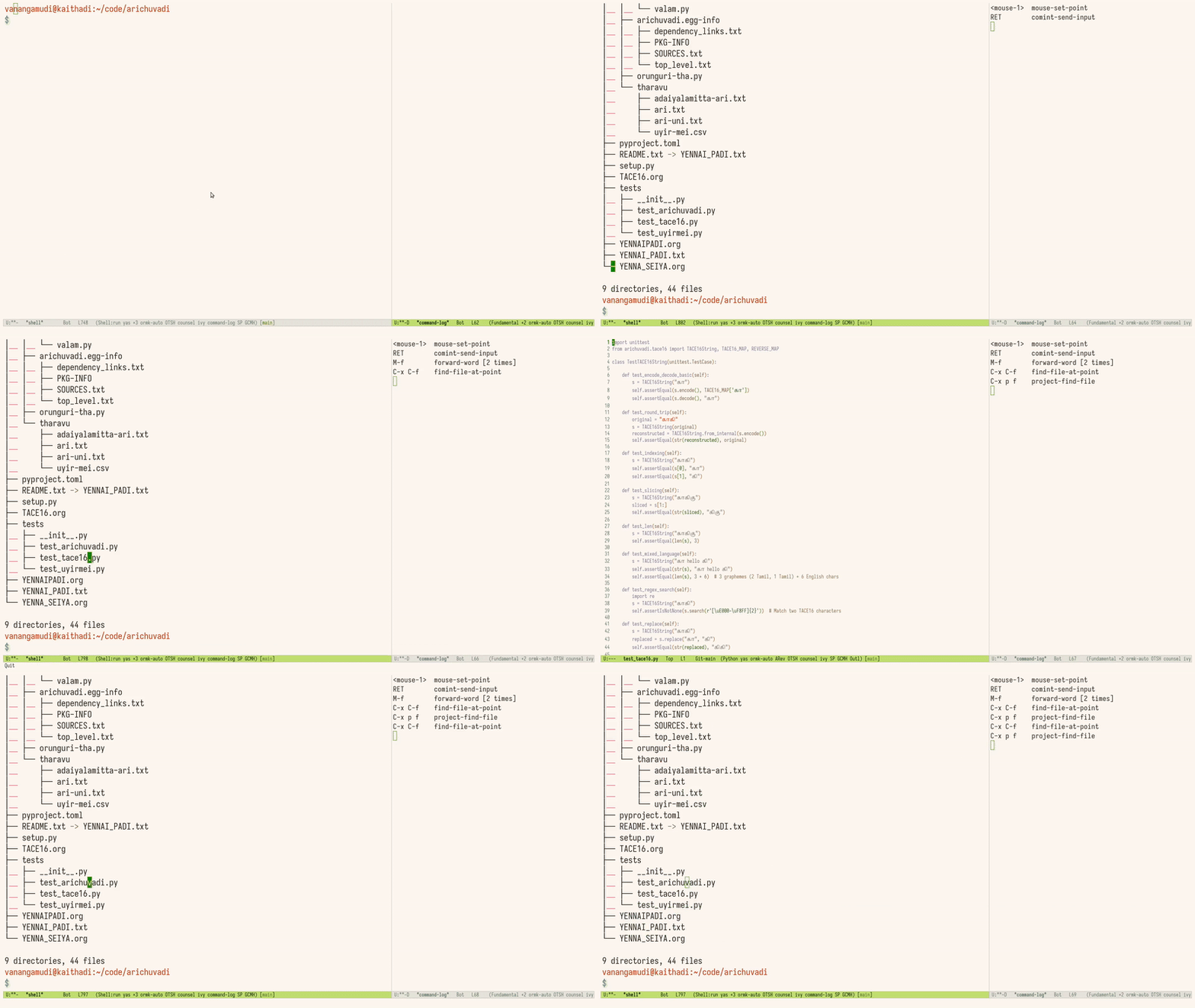
Here, placing point on valam.py and invoking C-x C-f does not help ffap has no full path to work with. But Emacs has another trick.
project-find-file
With C-x p f (project-find-file), Emacs lets you open any file in the current project by typing just its name. If you type: valam.py.
Emacs correctly resolves and opens: mlm/arichuvadi/valam.py
So now we have two powerful behaviors:
ffap: great when a full path is presentproject-find-file: great when only a filename is available
Best of both worlds
What if we could make them work together? Wouldn’t it be great if placing point on valam.py in the tree output and invoking C-x p f just worked? With a small piece of advice, we can teach project-find-file to look at the text under point and use it as initial input. The minimal version looks like this:
(defun my/project--filename-at-point ()
  "Return a filename-like string at point, or nil.
Uses ffap first, then falls back to thing-at-point."
  (or (ffap-string-at-point)
      (thing-at-point 'filename t)))

(defun my/project-find-file-advice (orig-fun &rest args)
  (let ((initial (my/project--filename-at-point)))
    (minibuffer-with-setup-hook
        (when initial
          (lambda () (insert initial)))
      (apply orig-fun args))))

(advice-add 'project-find-file :around #'my/project-find-file-advice)
Now, when point is on valam.py and you press C-x p f, the minibuffer opens with valam.py already inserted. The above code was written with tree output in mind and to make this more robust especially when point is on an absolute path we can convert paths into project-relative form when appropriate:
(require 'project)
(require 'ffap)

(defun my/project--filename-at-point ()
  (or (ffap-string-at-point)
      (thing-at-point 'filename t)))

(defun my/project--relative-filename-at-point ()
  (when-let* ((proj (project-current))
              (root (project-root proj))
              (path (my/project--filename-at-point)))
    (cond
     ((and (file-name-absolute-p path)
           (string-prefix-p root path))
      (file-relative-name path root))
     ((not (file-name-absolute-p path))
      path)
     (t nil))))

(defun my/project-find-file--advice (orig-fun &rest args)
  (let ((initial (my/project--relative-filename-at-point)))
    (minibuffer-with-setup-hook
        (when initial
          (lambda () (insert initial)))
      (apply orig-fun args))))

(advice-add 'project-find-file :around #'my/project-find-file--advice)
To remove the advice later:
(advice-remove 'project-find-file #'my/project-find-file--advice)
Closing thoughts
It’s a perfect reminder of why Emacs shines. This is a small tweak, and can be done with very little effort. When defaults don’t align with your mental model, you don’t fight the editor or its plugin system. you just write couple of function and make it do what you want.